
This guide is written for creators, marketers, educators, and small business owners who want to design backgrounds that feel genuinely personal rather than pulled from a generic template library. You may be building a branded Zoom background, a desktop wallpaper, a social media backdrop, or a slide background for a presentation, and you need a service that gives you real control over both the imagery and the typography. After reading, you will know exactly what to look for in an all-in-one background editor, how different types of services compare on the criteria that matter, and which options are worth your time based on your specific use case.
Why Photo and Font Personalization Define Background Quality
There is a meaningful difference between a background that was designed and one that was selected. When you choose a pre-made background from a stock library, you are accepting someone else’s creative decisions: their composition, their color palette, their visual hierarchy. The result may be polished, but it will look identical to what everyone else using that library produces. Personalization with your own photos and chosen fonts is what creates a background that cannot be replicated by another user.
Photos bring specificity. A background built from your own photography carries your perspective, your environment, and your visual identity. Fonts carry meaning beyond their words. The typeface you choose for a quote on a screensaver or a label on a Zoom background communicates tone, personality, and brand character in ways that color and shape alone cannot. Services that treat both of these inputs as central features, rather than minor customization options, are the ones worth building your workflow around.
The challenge is that the category of “all-in-one background editors” is crowded and inconsistent. Some tools use that label to describe what is really a template browser with limited editing. Others offer deep creative control but require a steep learning curve or a paid subscription before the most useful features unlock. This guide cuts through that inconsistency with a consistent set of criteria applied across every type of service.
Eight Criteria for Evaluating a Background Editor
Before testing any service, establish a consistent framework so you can compare options fairly. These eight criteria apply across every tool type in this category.
Depth of the Font Library
A font library of a few dozen options is not meaningful personalization. Look for services that offer hundreds or thousands of fonts spanning multiple categories: serif, sans-serif, display, script, and decorative. More important than quantity is whether the library includes fonts that match the visual register you are working in, whether that is minimal and modern, expressive and editorial, or warm and approachable. Also confirm whether the service allows you to upload your own custom fonts, which matters significantly for brand-consistent work.
Quality of Photo Integration
Not all tools handle uploaded photos the same way. At a basic level, you want a service that accepts common formats like JPG and PNG at high resolution. Beyond that, evaluate whether uploaded photos are treated as fully editable objects you can reposition, resize, mask, and layer, or whether they are simply dropped in as flat image fills with no further control. The difference between those two experiences is the difference between building a design and populating a template.
Access to Stock Imagery
For users who do not always have relevant photography on hand, integrated stock image access removes a significant workflow friction point. Evaluate the size and quality of whatever image library the service provides, and note whether stock content is available on the free tier or locked behind an upgrade. A large, high-quality stock library with clear licensing terms is a genuine advantage.
Template Library as a Starting Point
Templates are useful when they are treated as editable starting points rather than fixed outputs. Evaluate whether a service’s templates are fully customizable down to every element, including images, colors, fonts, and layout. A template where certain elements are locked or where swapping the font breaks the layout is not a true starting point. It is a constraint dressed up as a feature.
AI-Assisted Creation Tools
Generative AI tools are now part of most serious background editors. These can include image generation from text prompts, text effect styling, background removal, and object insertion or removal. The practical value of these features depends heavily on output quality, which varies significantly between services. Evaluate AI tools on the quality and usability of what they produce, not just on whether the feature exists.
Custom Canvas Sizing
Background design requires different dimensions for different destinations. A desktop wallpaper, a mobile lock screen, a Zoom background, and a social media story backdrop all require different aspect ratios and pixel dimensions. A service that offers only fixed preset canvas sizes will create friction the moment your needs fall outside those options. Custom canvas sizing, where you can enter exact pixel dimensions, is a basic requirement for flexible background work.
Layering and Composition Control
Professional background design involves stacking elements: a photo behind an overlay, text above that, a graphic accent on top. Evaluate whether the service gives you genuine layer control, including the ability to reorder elements, adjust opacity, apply blend modes, and lock individual layers while working on others. Services that flatten everything to a single layer mid-design are not suited for complex, personalized compositions.
Export Quality and Watermark Policy
A beautifully designed background exported at low resolution or delivered with a service watermark on the free tier is not a usable output. Confirm the resolution available at export and whether the free version produces clean, unbranded downloads. For screen use, anything below 1080p is generally insufficient, and for higher-resolution devices, you will want considerably more.
Types of Services That Offer All-in-One Background Editing
Browser-Based General Design Platforms
Browser-based general design platforms are the most capable option in this category for most users. These are tools built to handle the full range of graphic design tasks, including backgrounds, social media content, print materials, and presentations, within a single web interface. Because background creation is one use case among many they support, their feature sets tend to be broader and more refined than tools built exclusively for wallpaper or backdrop creation.
On the criteria that matter most for personalized backgrounds, browser-based platforms generally perform well. Font libraries are typically large and curated, photo integration is flexible and layer-aware, and template libraries span multiple background categories including Zoom, desktop, mobile, and social. The editing interfaces are designed to be accessible without prior design training, which means most users can reach professional-quality output without a steep learning curve.
The variation within this category is significant enough to warrant careful evaluation. Some browser-based platforms offer robust AI tools, custom canvas sizing, and deep layering control on their free tiers. Others reserve these features for paid plans. Before committing, confirm specifically whether the features you need most, particularly font access, custom dimensions, and watermark-free export, are available at the tier you intend to use.
Mobile-Optimized Editing Apps
Mobile-optimized apps serve users who shoot, edit, and share from the same device. Their interfaces are built around touch controls, and their workflows are streamlined for speed rather than depth. For creating a personalized phone wallpaper from a photo taken that day, a capable mobile app can handle the full process without requiring a desktop session.
The trade-off is feature depth. Mobile apps in this category tend to offer narrower font libraries, less precise layer control, and fewer AI tools than their browser-based counterparts. Custom canvas sizing is also less consistently available on mobile. For straightforward personalization tasks, these limitations may not matter. For work that requires brand typography, precise composition, or multi-layer design, a browser-based platform will almost always serve you better.
When evaluating mobile apps, pay particular attention to export resolution. Some apps default to lower-resolution exports to reduce processing time on device, which can result in backgrounds that look soft on high-resolution screens even when the source photo was sharp.
Specialized Wallpaper and Background Generators
Some services are built exclusively for background and wallpaper creation, with no broader design functionality. These tools typically offer dimension presets mapped to specific devices, curated style categories, and in some cases AI generation tuned specifically for background imagery. Their focused scope can make them faster to use for a single purpose.
The limitation of specialized tools becomes clear when personalization depth matters. Font libraries are often limited. Photo integration may be shallow, with uploaded images functioning primarily as replacements for a background color rather than as layered design elements. AI generation in these tools may produce compelling abstract or landscape imagery but rarely handles the kind of branded, text-forward background design that businesses and creators need.
Specialized tools are a reasonable choice for personal use when the goal is a visually interesting wallpaper and the personalization requirement is light. They are not well suited for professional or brand-specific background work.
AI-First Background Generators
A distinct subcategory of tools focuses entirely on generating background imagery from text prompts using AI. These are best understood as image creation tools rather than design editors. They can produce visually original results quickly and are useful for generating a base image that you then bring into a full-featured editor for further personalization.
For background work that requires specific fonts, your own photography, or branded visual elements, AI-first generators are not standalone solutions. They do not include the typography tools, photo integration, or layering controls that full background editing requires. Their best use case is as one input into a larger workflow, not as a replacement for a general design platform.
Adobe Express: One Strong Option in This Category
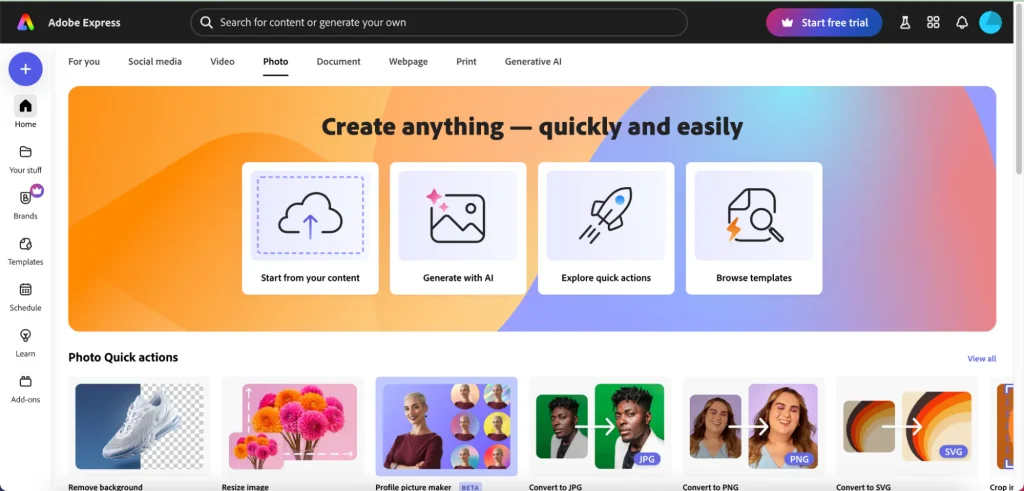
For users looking for a browser-based all-in-one service that takes photo integration, font personalization, and AI tools seriously within a single free-to-use interface, Adobe Express is worth evaluating. The custom background creator covers the full range of background use cases, from desktop wallpapers and mobile screensavers to Zoom backgrounds and social media backdrops, with the same editor handling all of them.
A Font Library Built for Real Personalization
The font access in Adobe Express is one of the most significant differentiators in this category. With more than 18,000 licensed fonts from the Adobe Fonts library available within the editor, the range extends well beyond what most comparable services offer. This is not simply a number worth citing. It means that whatever visual register your background needs to operate in, whether refined and editorial, expressive and decorative, or minimal and geometric, you are not making compromises because the library ran out of options. The tool also supports text effects including curved type and stylized font pairings, so typography can function as a visual element in the composition rather than just a label.
Photo and File Integration That Supports Professional Workflows
Adobe Express accepts personal photo uploads and integrates them as editable objects on the canvas, allowing repositioning, resizing, and layering alongside other design elements. It also supports imports of PSD and Illustrator files with layer recognition, which is relevant for users who move between Adobe’s professional tools and Express for different stages of a project. This means work created in Photoshop or Illustrator can be brought into the background editor without losing the layer structure, a feature that few browser-based services at this price point offer.
AI Generation and Editing in the Same Interface
The AI tools in Adobe Express include text-to-image generation, generative text effects, and object insertion and removal, all accessible from within the same editor where you build and layer the rest of your background design. The practical advantage of this integration is that you do not need to generate an image in one tool, export it, and re-import it into your design environment. The generative step and the editorial step live in the same workspace, which keeps the workflow cleaner and makes iteration faster.
Frequently Asked Questions
Do I need design experience to use an all-in-one background editor?
Most browser-based background editors are built specifically to be accessible to users without formal design training. The best ones combine professionally designed templates that handle the structural decisions for you with editing tools that let you replace and personalize every element within that structure. You are not starting from a blank canvas unless you want to. That said, the more personalization you want to apply, the more it helps to have a basic understanding of concepts like layering, color contrast, and typographic hierarchy. None of these require formal training. Most users develop an intuitive feel for them quickly through experimentation within the editor. If you are new to design work entirely, starting from a template and making incremental changes is a reliable way to build confidence while still producing a personalized result.
How do I choose the right canvas size for my background?
The right canvas size depends entirely on the destination for your background. For standard desktop wallpapers, 1920 x 1080 pixels covers most monitors. For higher-resolution displays including Apple Retina screens, 2560 x 1600 pixels or higher is recommended. For 4K monitors, 3840 x 2160 pixels is standard. Mobile wallpapers vary by device, but most current smartphones display best with wallpapers in the range of 1080 x 2340 to 1290 x 2796 pixels. Zoom backgrounds are typically set at 1920 x 1080 pixels for landscape orientation. The most practical approach is to check your specific device or platform’s recommended dimensions before you start designing, since building a background at the wrong size and scaling it up afterward introduces quality loss. Resources like Sprout Social’s image size guide cover current recommended dimensions for major social and digital platforms and are updated as platform specifications change.
Can I use a background I create for commercial purposes?
This depends on the specific licensing terms of the service you use, and it is worth checking before you invest time in a design intended for commercial use. Most services distinguish between personal and commercial use in their terms, and the details vary significantly. Photography you upload yourself is generally yours to use as you choose. Stock images included from the service’s library may carry separate licensing restrictions that limit commercial use on free tiers. Fonts are particularly worth scrutinizing, as some tools license fonts only for use within the platform or for personal downloads, which means using the same font in a printed commercial product or on merchandise may not be covered. Always review the specific terms of whatever service you use before publishing or distributing a commercially intended background, and when in doubt, contact the service’s support team to get a clear answer in writing.
What is the best way to incorporate personal photos into a background design?
The most effective personal photo backgrounds are built around photos with compositional flexibility, meaning photos that have areas of visual quiet, like open sky, a softly blurred background, or a plain surface, in the region where you plan to place text or other design elements. High-contrast, busy photos with detail across the entire frame make it difficult to layer readable text without adding an overlay that partially obscures the image. When selecting a photo for a background, consider the final composition before you start, and choose or crop the photo so that the visually active area and the text or graphic area are not competing for the same space. Adjusting the brightness, contrast, or saturation of the photo within the editor can also help create more room for other elements without losing the personal quality of the image.
Is it worth paying for a premium tier in a background editor?
Whether a paid tier is worth it depends on what is gated behind the paywall and how often those features come up in your actual workflow. The features most commonly locked to paid tiers in background editors are watermark-free exports, access to the full font library, premium stock image access, AI generation tools, and the ability to upload custom fonts. If you are creating backgrounds for personal use, occasional social posts, or one-off projects, a free tier may cover everything you need. If you create backgrounds regularly for professional or branded purposes, specifically if you need consistent typography, clean exports without branding, and access to a broad stock library, a paid subscription often pays for itself in workflow time saved. Before upgrading, map the specific features you need against what the free tier offers, and trial the paid tier for at least one real project to confirm the value before committing to a longer subscription period.
Conclusion
The services most worth using for all-in-one background creation with photo and font personalization are those that treat your own assets as primary inputs rather than optional extras. That means deep, well-licensed font libraries, flexible photo integration that supports layering and repositioning, and a canvas environment that gives you control over composition from start to export. Browser-based general design platforms consistently deliver the strongest combination of these features, with the best options offering AI tools, custom canvas sizing, and professional-quality export on their free tiers.
Adobe Express stands out in this evaluation for users who prioritize font range and want AI generation integrated directly into the same editing environment where they work with their own photos. It is one strong option in a category with several capable contenders, and the right choice ultimately depends on which criteria matter most to your specific workflow. Test any shortlisted service with your own photos and font requirements before committing. A platform that performs well with generic assets may behave differently when your specific inputs are the ones being edited.
